How to Turn Your Photos into Custom Doodle Magnets
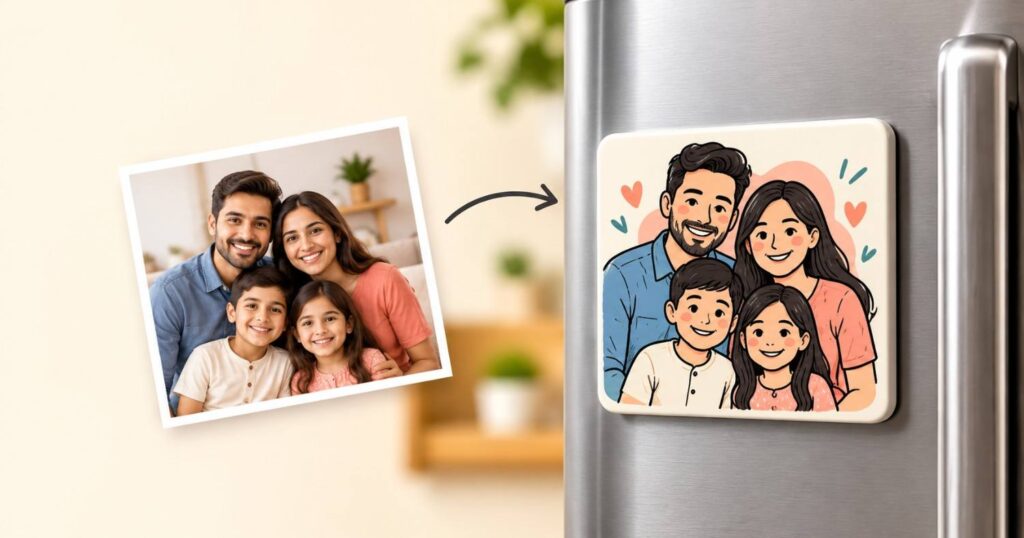
You can turn photos into magnets in a few simple steps. Pick a clear photo, choose a shape, and send it to a maker. A custom doodle magnet goes one step further. It changes your photo into a cute doodle before it becomes a fridge magnet.
This guide shows how the process works. You will learn what you need, how to turn a picture into a doodle, and how to choose a good magnet maker. We also compare DIY photo magnets with custom doodle magnets, so you can pick what fits you.
The steps below come from how Custom Doodle Magnets takes orders, plus common DIY methods. Where a fact is not published, such as exact delivery days, we say so.
Quick answer: To turn photos into magnets, choose a clear photo, pick a magnet shape and size, then upload it. For a doodle magnet, the team first turns your photo into a doodle design. At Custom Doodle Magnets, you upload a JPG, PNG or PDF, add any text, and can ask for a digital preview. The magnet is then made and shipped within India.
Table of contents
- How Do You Turn Your Photos into Custom Doodle Magnets?
- How to Turn a Photo into a Doodle?
- How to Make Your Own Custom Photo Magnets
- Where Can You Order Personalized Photo Magnets?
- Why Choose Custom Doodle Magnets?
- Expert Tips for Better Photo Magnets
- Common Mistakes to Avoid
- Key Takeaways
- Frequently Asked Questions About Custom Doodle Magnets
How Do You Turn Your Photos into Custom Doodle Magnets?
Choose a clear photo, pick a shape and size, upload it, check the preview, and place your order. The maker turns your photo into a doodle design, prints it, adds a magnetic backing, and ships it to you.
Here is the full process, step by step:
- Pick a clear photo. Choose one with a bright subject and a simple background. The site asks for clear, high-quality photos.
- Choose a shape and size. The order form lists circle, rectangle and square shapes. The FAQ page also mentions custom sizes on request and a popular 90 × 65 mm rectangle.
- Upload your photo. JPG, JPEG, PNG and PDF files work, and so do high-resolution phone photos.
- Add text or notes. You can add text to print and a special instruction, such as a name or a date.
- Check the preview. The order form has a “Preview My Magnet” button. The FAQ says a digital preview can be shared for approval before production, if needed.
- Place your order. Production starts after the design is approved. Orders ship by courier within India.
Ready to start? You can create your doodle magnet on the order page.
How Can I Turn My Photos into Magnets?
You have three main routes: order from a custom maker, make them at home, or use a local print shop. The best choice depends on the style you want and how much work you want to do.
- Order from a custom maker. Best for doodle style, gifts and event favors. You upload the photo and the team does the rest.
- Make them at home. Best for a plain photo magnet or a kids’ craft project. You need a printer and a few supplies.
- Use a local print shop. Best when you need a plain photo magnet fast. Style options differ from shop to shop.
You can use online photo-editing tools to turn a regular picture into a sketch before creating a personalized magnet. Tools like Fotor’s Photo to Sketch Converter help you explore different artistic styles for your photo.
What Materials Are Needed to Make Photo Magnets?
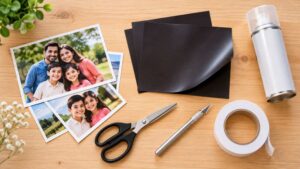
For a DIY photo magnet you need a printed photo, a magnetic sheet or magnet pieces, strong adhesive, scissors or a craft knife, and a clear sealer.
|
Material |
What it does |
|---|---|
| Printed photo | The image on your magnet. Glossy photo paper gives bright color. |
| Magnetic sheet or magnet pieces | Makes the photo stick to a fridge or board. |
| Strong adhesive or double-sided tape | Holds the photo to the magnet. |
| Scissors or craft knife | Cuts clean edges. |
| Clear sealer or laminate | Protects the print from scratches and fingerprints. |
A custom maker handles all of this for you. Custom Doodle Magnets lists acrylic magnets, customized magnets, key-rings and steel wall plates in its shop.
How to Turn a Photo into a Doodle?
Trace the main shapes of your photo with simple, bold lines, then add small touches like stars or hearts. You can do this by hand, in a drawing app, with an AI tool, or by asking a doodle maker to do it for you.
How Can I Turn My Picture into a Doodle?
Pick the method that matches your time and skill. Each one gives a different result.
|
Method |
Skill needed | Best for |
Watch out for |
|---|---|---|---|
| Trace by hand | Low to medium | One special photo | It takes time |
| Drawing app on a tablet | Medium | Clean lines you can edit | You need an app and a steady hand |
| AI image tool | Low | Quick ideas | Faces and details can change |
| Doodle maker | None | A finished magnet | Check the preview before approving |
If you want to trace a photo yourself, follow these steps:
- Print the photo or open it on a tablet.
- Lay thin paper or a new layer over it.
- Trace only the main outlines, such as the face, hair and shapes of clothes.
- Skip small details. Doodles look best when they are simple.
- Add color blocks and a few playful marks.
Can ChatGPT Turn a Photo into a Sketch?
Often, yes. ChatGPT can restyle an uploaded photo as a sketch or doodle when its image tools are available on your plan. Results vary from photo to photo.
Keep these limits in mind:
- It may change faces, add details, or remove details.
- The final image may be too small to print sharply on a magnet.
- Upload only photos you own or have permission to use.
- Always check the result against your original before you use it.
For a print-ready doodle magnet, a maker’s team reviews your image for you. Custom Doodle Magnets says it contacts you if a higher-quality version of your photo is needed.
How to Make Your Own Custom Photo Magnets
Print your photo, seal it, cut it to size, and stick it onto a magnetic sheet or magnet base. A simple DIY magnet needs only a few supplies and no special skills.
How Can I Make My Own Magnets for Pictures?
Follow these seven steps:
- Choose a photo with strong contrast. A bright subject on a plain background prints best.
- Resize it. Set the photo to the size you want. Leave a thin border for trimming.
- Print it. Use glossy photo paper for bright color.
- Let the ink dry fully. Wet ink smudges when you seal it.
- Seal the print. Use a clear sealer or laminate to protect it.
- Cut it neatly. Use sharp scissors or a craft knife.
- Attach it to a magnet. Stick the photo to a magnetic sheet with strong adhesive, trim the edges, and test it on your fridge.
Thin magnetic sheet can be weak. Test one magnet before you make a whole set.
DIY Photo Magnets vs. Custom Doodle Magnets
DIY magnets suit quick, plain photo crafts. Custom doodle magnets suit gifts and events where you want a finished, designed look.
|
Point |
DIY photo magnets |
Custom doodle magnets |
|---|---|---|
| Style | Your photo as it is | Your photo turned into a doodle design |
| Your effort | You print, seal, cut and assemble | You upload a photo and the team designs and makes it |
| Tools needed | Printer, paper, magnetic sheet, adhesive, cutter | None |
| Preview | You see it as you work | A digital preview can be shared before production |
| Quantity | Best for a few magnets | One magnet or many, with bulk orders for events |
| Best for | Craft time, school projects | Gifts, weddings, birthdays, party favors |
Where Can You Order Personalized Photo Magnets?

You can order personalized photo magnets from online custom magnet makers, local print shops, and gift stores. For doodle-style magnets, choose Custom Doodle Magnets, which transforms your photos into unique doodle designs and ships across India.
What Is a Personalized Photo Magnet?
A personalized photo magnet is a small magnet printed with your own image. The image can be a family photo, a pet picture, a child’s drawing, a logo or a short line of text. People stick them on fridges, lockers, office cabinets and magnetic boards.
A doodle magnet is one kind of personalized photo magnet. It uses a drawn, playful version of your photo instead of the photo itself.
How Do You Choose a Custom Photo Magnet Website?
Look for a site that makes each step clear. Use this checklist before you pay:
- Clear order steps. You should know what to upload and what happens next.
- File types listed. The site should say which formats it accepts.
- A preview option. Seeing the design before production avoids surprises.
- Easy contact. Look for a form, email or chat for questions.
- Shipping area. Check that the maker ships to your address.
- Bulk options. This matters if you need favors for an event.
- Policies you can read. Check shipping and return pages.
Here is how Custom Doodle Magnets fits this list. It has an upload form with shape choices, a preview option, and contact through a form, email or WhatsApp. Its FAQ says it ships within India only. It also says production time depends on quantity and customization, and it does not list a fixed number of days. If you need magnets by a set date, ask the team before you order.
Why Choose Custom Doodle Magnets?
Custom doodle magnets turn an ordinary photo into a playful keepsake. They work well as gifts, event favors and everyday home or office decor.
|
Benefit |
What it means for you |
|---|---|
| Personal touch | Use your own photo, pet picture, child’s drawing or logo. |
| Doodle style | A simple, cheerful look that stays clear at a small size. |
| Easy ordering | Upload a photo, pick a shape, add text and ask for a preview. |
| Flexible quantity | Order one magnet or many, with bulk orders for events. |
| Many places to use | Fridges, lockers, office cabinets and magnetic boards. |
| Built for daily use | A durable magnetic backing, made for everyday indoor use. |
See the full range on the custom magnets page.
Are Custom Doodle Magnets Good Personalized Gifts?
Yes. They are small, personal and easy to ship. A magnet keeps a memory in view every day, and a doodle adds a bit of humor and warmth.
They suit:
- Couples, parents and grandparents who love family photos
- Pet owners
- Teachers and kids who want to keep a drawing
- Guests at a wedding or party
- Teams who want branded gifts with a logo
If you need many magnets, the bulk order page is the place to start. The site says to contact the team for bulk pricing, because prices are not listed online.
What Occasions Are Best for Giving Photo Magnets?

Photo magnets fit most celebrations because they are light, personal and low-fuss. The Custom Doodle Magnets FAQ names birthdays, anniversaries, weddings, Mother’s Day, Father’s Day and housewarmings.
|
Occasion |
Why a Magnet Works |
|---|---|
| Weddings | A small favor guests can keep on the fridge. |
| Birthdays | A fun party favor or a gift with a personal touch. |
| Baby Showers | A sweet keepsake for new parents. |
| Anniversaries | A shared photo turned into a doodle. |
| New Beginnings | A housewarming or fresh-start gift. |
Expert Tips for Better Photo Magnets
A good magnet starts with a good photo. These tips help any method, DIY or custom.
- Pick one clear subject. One face, one pet or one drawing reads better than a crowd.
- Use bright, even light. Dark or shadowy photos look muddy when printed small.
- Crop close. Magnets are small. A tight crop on the face or subject keeps details visible.
- Upload the original file. Send the photo from your phone or camera, not a screenshot or a photo of a screen.
- Use a supported file type. Custom Doodle Magnets accepts JPG, JPEG, PNG and PDF files.
- Keep text short. A name or a date fits well. Long lines get tiny.
- Ask for a preview. Check names, spelling and faces before production starts.
- Plan ahead for events. The site gives no fixed production time, so ask the team early.
Common Mistakes to Avoid
Most problems come from the photo, not the printing. Watch for these:
- Using a blurry or tiny photo. The team may ask you for a better version, which slows your order.
- Choosing a busy background. Clutter makes a doodle hard to read.
- Adding too much text. Small letters are hard to see on a magnet.
- Skipping the preview. Spelling mistakes are easy to miss and hard to fix later.
- Ordering at the last minute. Production time depends on quantity and customization.
- Using photos you do not have rights to. Use your own photos or ones you have permission to print.
- Forgetting where it ships. Custom Doodle Magnets ships within India only.
- Giving small magnets to young children. Keep small magnets away from babies and toddlers, because they are a swallowing risk.
Key Takeaways
- To turn photos into magnets, start with a clear, bright photo and a simple background.
- A doodle magnet turns your photo into a drawn design before it is printed.
- At Custom Doodle Magnets, you upload a JPG, PNG or PDF, choose a shape, add text and can ask for a preview.
- DIY magnets suit quick crafts. Custom doodle magnets suit gifts and events.
- ChatGPT and other AI tools can create sketch styles, but check faces and print size.
- Production time depends on quantity and customization, so ask early if you have a deadline.
- Shipping is within India only.
Conclusion
You now know how to turn photos into magnets, whether you make them at home or order them made. The key is a clear photo, a simple design and a quick check of the preview.
If you want a finished doodle magnet without the DIY work, let the team handle it. Create your doodle magnet today, or contact the team with questions about your photo, your event date or a bulk order.
Frequently Asked Questions About Custom Doodle Magnets
Can I Personalize a Magnet with My Own Photo?
Yes. You can upload your own photo, and the team turns it into a doodle magnet. Family photos, pet pictures, children’s drawings and logos all work. Most clear, high-quality photos are accepted.
How Long Does It Take to Make Custom Photo Magnets?
It depends on how many magnets you order and how much customization you want. Production starts after your design is approved. The site does not list a fixed number of days, so ask the team if you have a deadline.
What File Types Can I Upload?
You can upload JPG, JPEG, PNG and PDF files. High-resolution phone photos also work. Clear, high-quality images give the best result.
Can I See a Preview Before My Magnet Is Made?
Yes. The order form has a “Preview My Magnet” button. The FAQ also says a digital preview can be shared for approval before production, if required.
What If My Photo Is Low Quality?
The team reviews your image. If a better version is needed, they contact you before going ahead.
Can I Order Just One Magnet?
Yes. You can order a single magnet or several.
Do You Offer Bulk Orders for Events?
Yes. Bulk orders suit weddings, birthday parties, corporate events, return gifts and promotions. Contact the team for bulk pricing through the bulk order page.
Do You Ship Outside India?
The FAQ says shipping is within India only, through courier partners.
Can I Use My Child’s Drawing or a Logo?
Yes. The team turns children’s artwork, doodles and logos into magnets, as well as photos.
Are Custom Doodle Magnets Strong Enough for a Fridge?
The magnets have a durable magnetic backing, made to stick to fridges, lockers, office cabinets and magnetic boards. They are designed for everyday indoor use. Read more answers on the FAQs page.